
Configure
Accounts and usage
Switch between several Claude Code or Codex logins, and watch your rate-limit windows in the footer. Both features work only with Claude Code and Codex for now; other agents keep using their own login as usual.
#Multiple accounts
Accounts are optional. Add them only if you switch between several.
- Open Settings → Accounts, or Manage Accounts… from the footer usage menu.
- Add Account starts the agent's login in a built-in terminal tab.
- Pick the account to use. Running tabs keep their account. New tabs use the selected one.
How it works: each added account gets its own config directory, <userData>/accounts/<agent>/<id>/. Ferret launches the agent with CLAUDE_CONFIG_DIR (Claude Code) or CODEX_HOME (Codex) pointing there. System Default uses your usual ~/.claude / ~/.codex unchanged.
Removing an account deletes its config directory. It does not sign you out on the server.
#Usage in the footer
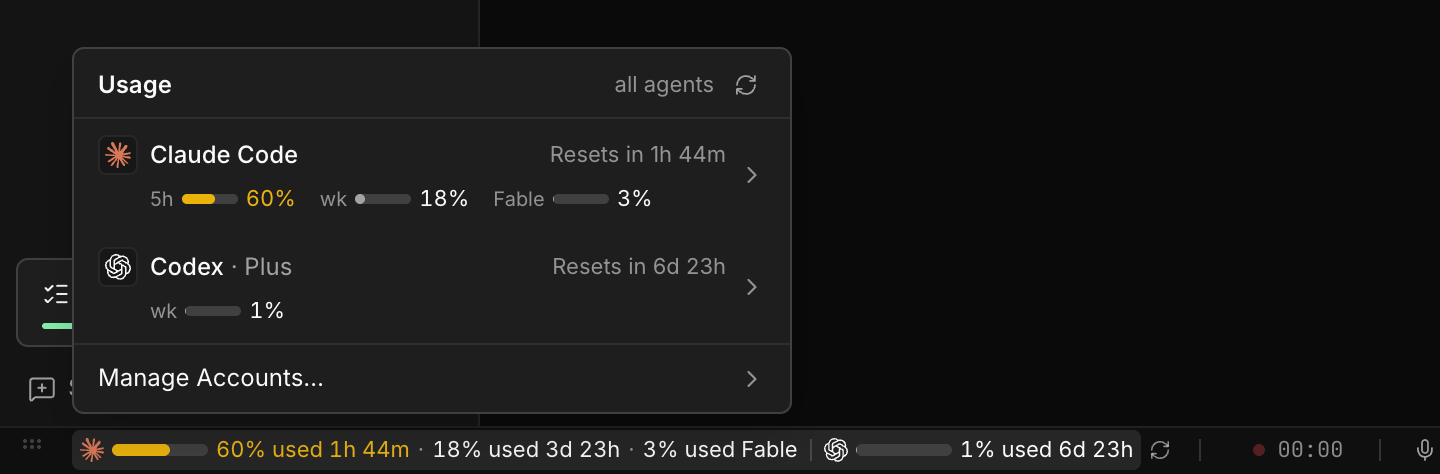
The footer shows how much of each rate-limit window is used: the 5-hour window and the weekly window, plus the per-model weekly window for Claude. Colors turn yellow at 60% and red at 80%. Values refresh every 15 minutes, or on Refresh usage.
How much is shown depends on the space in the footer. With room it shows bars, window names, and percentages. As the footer gets narrower it drops the less useful parts first, down to one percentage per agent. Click the usage to see everything in a popover.
Usage is fetched directly from Anthropic (api.anthropic.com/api/oauth/usage) and ChatGPT (chatgpt.com/backend-api/wham/usage) with the signed-in account's own credentials.
#Keep working at usage limits
When an agent reaches its usage limit, Ferret continues the same work in the same project folder, so a long task does not stop at the limit. It is on by default and set in Settings → Accounts → Switch on usage limits.
The work is handed over through one file in the project, .ferret/handoff.md, so it works between accounts and between different agents alike. The Send to Agent instructions ask the agent to keep that file up to date at each milestone and when it gets close to a usage limit: the goal, what is done, the remaining work as a checklist, the files it changed, the next step, the related feedback.md and review paths, and anything to watch out for. .ferret/ stays out of git (it is added to .git/info/exclude, not to .gitignore).
- Ferret notices the limit from the agent's own message in the terminal (for example
5-hour limit reached ∙ resets 3pmin Claude Code,You've hit your usage limitin Codex) or from the footer usage reaching the threshold (95% by default; the highest of the 5-hour, weekly and per-model windows). - Before switching, Ferret asks the current agent to update
.ferret/handoff.md. If the agent does not start working on it (for example because it is already at its limit), Ferret adds what it knows to the file: the last request, wherefeedback.mdis, and the changed files fromgit status. - Ferret then switches to another signed-in account of the same agent, the one with the lowest usage. When every account of the agent is at its limit, the work moves to the next agent in Agent order (default: Claude Code → Codex → Gemini CLI).
- The new agent opens in a new tab in the same project and is told, in the app language, to read
.ferret/handoff.mdfirst and continue with the remaining work. - The footer shows Now on <agent> and a notice says what changed, for example Codex reached its usage limit, so Claude Code took over the work. The tab that hit the limit is closed, so it does not pick the same task up again when its limit resets.
| Setting | Default |
|---|---|
| Switch automatically when a usage limit is reached | On |
| Count an account as at its limit from | 95% |
| Try another account of the same agent first | On |
| Agent order | Claude Code, Codex, Gemini CLI. Agents not in the list are not used. |
| Move back to a higher agent when its limit resets | Off (keep working with the current agent). On moves the work back while the tab is waiting for input. |
Switching stays inside the project, at most 6 times an hour and at least a minute apart. Credentials stay in each account's own config directory and are never copied. In settings.json these are under limitFailover.